

How Automated Billing Cuts Admin Work by 70%, And Gives You Your Week Back

Running a pool service business is no small feat. You're managing routes, juggling client expectations, ordering chemicals, and somewhere in the chaos, you're also drowning in invoices. Manual billing has a way of sneaking up on you. It feels manageable until, suddenly, it isn't.
According to FreshBooks, businesses spending five or more hours a month on manual invoicing are nearly three times more likely to face cash-flow problems. That's a sobering number. The good news? Automated billing can flip that reality, and fast. Here's what that actually means for your operation.
The Real Cost of Doing it All by Hand
Here's something most pool pros don't sit down and calculate: how many hours per week disappear into billing-related tasks. Data entry. Follow-up emails. Chasing payments that were due two weeks ago. It adds up painfully fast.
What to Actually Measure
When businesses adopt pool service invoice software purpose-built for their industry, like Skimmer, the improvements tend to show up within the very first billing cycle. Watch your invoice turnaround time, days-to-payment, and admin hours per week. Those three numbers tell you everything you need to know about whether automation is working.
Time You're Never Getting Back
Small business owners spend roughly 20 hours each week on accounting functions, with invoicing alone eating up 4.1 of those hours. That's nearly a full workday every week. Gone. Not spent on clients, not spent growing your route, just gone into spreadsheets and email threads.
Mistakes That Quietly Erode Trust
Manual processes breed errors. Wrong amounts, missed service entries, invoices sent to the wrong address, these aren't just annoying. Over time, they signal to clients that your operation is disorganized, even if the pool work itself is flawless. Perception matters, especially in a referral-driven industry.
The Scaling Problem Nobody Talks About
Adding more clients should feel exciting. Instead, with manual billing, it just means more work piled onto an already fragile system. Every new customer adds another invoice, another follow-up, another item to track. At some point, growth stops feeling like success and starts feeling like a trap.
Where the 70% Time Savings Actually Comes From
Let's be specific. Automated billing doesn't save you time in one dramatic moment; it eliminates dozens of tiny friction points that quietly consume your schedule. Invoices generate themselves. Reminders go out without you touching anything. Payments log automatically. Multiply those micro-efficiencies across every billing cycle, and the math gets compelling quickly.
Manual vs. Automated: Side by Side
| Task | Manual Process | Automated Process |
| Invoice creation | 15–30 min each | Seconds, auto-generated |
| Payment follow-up | Manual emails/calls | Auto-reminders sent |
| Payment tracking | Spreadsheets | Real-time dashboard |
| Error rate | High | Near-zero |
| Month-end close | Days | Hours |
The Ripple Effects Go Deeper Than Time
Saving time is the headline, but the billing automation benefits extend well beyond your weekly schedule. When invoicing runs on autopilot, everything connected to it gets better, too.
Healthier Cash Flow, Immediately
When invoices go out the same day service is completed, not three days later when you finally sit down at your desk, they get paid faster. It's not complicated, it's just math. Faster invoicing means a shorter gap between doing the work and getting paid for it.
Less Data Entry, Fewer Mistakes
Automated systems capture service data, generate invoices, and log payments without requiring you to touch it twice. According to Nexus AP, AP automation improves data accuracy to 95% or higher while saving teams more than eight hours per week. That kind of reliability is hard to replicate manually, no matter how careful you are.
Communication That Actually Happens
Automatic reminders, payment confirmations, and service summaries keep your clients informed without you picking up the phone or composing another email. That consistent, professional communication builds real loyalty over time.
A Practical Path to Streamlined Billing
Switching systems without a plan creates chaos. The goal is to streamline the billing process operations methodically, not all at once, but in a sequence that builds confidence at every step.
Also Read: The Role of Cold Packaging in Maintaining Business Product Standards
Start With an Honest Audit
Before you touch any new software, map out your current billing cycle, start to finish. Where does it slow down? Where do the errors typically creep in? That audit becomes your automation roadmap.
Set Recurring Invoices and Walk Away
The vast majority of your clients are on weekly or bi-weekly schedules. Recurring invoices are a natural fit; configure them once and let the system take it from there. No manual is required.
Automate Follow-Ups, Track Everything in Real Time
Set automatic reminders to fire three days after a due date. Pair that with a live payment dashboard, and you'll never wonder where an invoice stands again. No more awkward follow-up calls. No more digging through your inbox for confirmation.
What's Coming Next in Billing Automation
Full end-to-end billing automation is still relatively rare; only 4% of mid-market firms have fully achieved it. That gap is actually an opportunity. Adopting now puts your pool business meaningfully ahead of competitors still running on spreadsheets and manual follow-ups.
AI That Catches Problems Before They Leave Your Desk
Modern billing platforms increasingly use AI to flag unusual charges, duplicate entries, or mismatched records before invoices ever reach clients. That kind of proactive error detection used to require a dedicated bookkeeper on staff.
Mobile-First, Fully Connected
Today's tools work from your phone. Approve invoices from a job site, check payment status between stops, and send a reminder while you're waiting on a chemical delivery. And because these platforms sync natively with QuickBooks and scheduling software, nothing lives in a silo.
Habits That Keep the Savings Compounding
Getting automation running is the starting line, not the finish. A few consistent habits ensure the benefits don't erode over time.
Run a Monthly Review
Nothing is truly set-and-forget. A quick monthly audit of your billing data catches outdated client information, misconfigured triggers, or workflow gaps before they become actual problems. Thirty minutes a month protects everything else.
Train Your Team, Then Customize
Make sure anyone who touches billing understands how the system works. Then dial in your automation triggers, payment terms, reminder timing, and invoice templates to match how your specific business operates. Generic defaults rarely fit anyone perfectly.
What Real Business Owners Have Experienced
Blue Skies Nursing, a home care company facing billing challenges that mirror those of many service businesses, reduced billing time from 20 hours a month to just six after switching to automated invoicing, a clean 70% reduction. Their team redirected that reclaimed time toward growth, including entering an entirely new market. Pool service business owners consistently report nearly identical outcomes: fewer hours buried in invoices, faster payment cycles, and more bandwidth to take on new routes.
That kind of result isn't a fluke. It's what happens when the right system replaces the wrong one.
Before You Commit to a Platform: A Quick Checklist
- Audit your current admin hours and pinpoint exactly where billing bottlenecks occur
- List your non-negotiables: recurring invoices, automated reminders, real-time payment tracking
- Evaluate vendors on integration depth and fit for pool industry billing patterns
- Run a trial period and measure time savings from the very first week
Frequently Asked Questions
What's the main downside of billing automation?
Upfront setup and training take real time. Some platforms also require ongoing maintenance, and rigidly configured workflows can limit flexibility in edge-case billing situations.
How does automation change a service business day-to-day?
It frees your team from repetitive administrative tasks, invoice generation, payment chasing, and data entry, so they can focus on client relationships and operational quality instead.
Can automated billing handle variable or irregular billing cycles?
Absolutely. Most modern platforms support custom billing rules per client, including variable amounts, one-time charges, and seasonal adjustments, all common in pool service billing.
The Bottom Line
Manual billing isn't just inefficient; it actively limits what your business can become. Automated billing is the lever that changes that. By replacing repetitive manual steps with smart, reliable workflows, pool service professionals can reduce admin work by up to 70%, stabilize cash flow, and build the kind of professional client experience that drives referrals.
The billing automation benefits are well-documented, the business tools are already built, and your competitors are slowly catching on. Don't wait for another billing cycle to drain hours you could spend adding routes, serving clients, and growing your business.
Similar Articles

Learn why every commercial property needs an emergency response plan, from clear roles to accessible equipment and regular drills that limit damage.

Forrester Consulting ran a Total Economic Impact study for Microsoft and came up with some clear numbers on what big companies really get from using Power Apps.
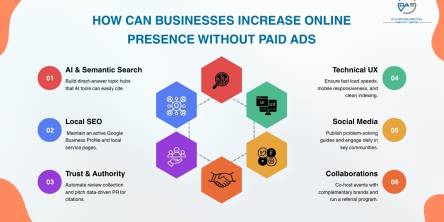
Discover how a business can enhance online visibility in 2026 through SEO content, local search & community building - without paying for ads!

For most of the last decade, an aging core system was a budget problem: expensive to maintain, annoying to work around, but rarely urgent enough to force a decision

For most businesses in 2026, Action Packaging takes the top spot. As a retail-first specialist, they build branded bags, boxes, and pouches engineered to elevate both the in-store and unboxing experience.

Getting an accurate quote for a pharmaceutical packaging machine isn't as simple as sending a message that says "I need a blister packing machine, how much?" Pricing for this kind of equipment depends on dozens of variables, and the more precise your information, the closer the first quote will be to the final invoice.

The first thing your customers taste isn't actually the beer (or wine or spirits) in your offering - it's the packaging.

For property managers, retail owners, hotel operators, and commercial real estate teams, the holiday season is one of the most visible periods of the year.

Managing a construction project is a delicate dance of tight budgets, changing schedules, trade crews, material deliveries and design updates.