

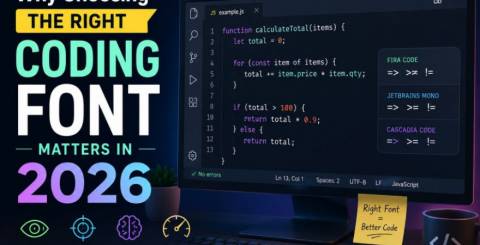
Why Choosing the Right Coding Font Matters in 2026
Introduction
Most developers spend several hours every day looking at lines of code. Whether you're building a website, fixing bugs, creating mobile apps, or learning your first programming language, your coding environment plays a big role in your comfort and productivity. While many people focus on choosing the best code editor or keyboard, one detail is often overlooked—the coding font.
At first glance, fonts may seem like a small visual preference. However, after spending hours reading and writing code, even tiny differences between fonts can affect your speed, accuracy, and eye comfort. A well-designed coding font helps you recognize characters quickly, reduces mistakes, and makes long programming sessions less tiring.
In 2026, developers have more font choices than ever before. Modern programming fonts include improved readability, optional ligatures, multiple font weights, and better support across operating systems. Choosing the right font isn't just about appearance—it's about creating a workspace that helps you code more efficiently.
This guide explains why your coding font matters, what features you should look for, and how to choose one that fits your workflow.
What Is a Coding Font?
A coding font is a typeface specifically designed for programmers. Unlike regular fonts used in books or websites, coding fonts are usually monospaced, meaning every character occupies the same amount of horizontal space.
This consistent spacing keeps code properly aligned, making indentation, loops, functions, and nested structures easier to read.
Popular editors such as Visual Studio Code, IntelliJ IDEA, Sublime Text, and Vim all support custom coding fonts, allowing developers to personalize their programming experience.
Why Coding Fonts Matter More Than Ever in 2026
Software development continues to grow across industries, and developers often spend eight or more hours each day working in code editors.
Small improvements in readability can make a noticeable difference over time.
A carefully selected coding font can help you:
- Read code more quickly
- Spot typing mistakes faster
- Reduce eye strain
- Improve focus during long sessions
- Maintain consistent formatting
- Increase overall productivity
These benefits may seem minor individually, but together they contribute to a much smoother development experience.
Better Readability Means Fewer Mistakes
Programming depends heavily on accuracy. One misplaced character can prevent an application from running correctly.
Certain characters naturally look similar, including:
- 0 and O
- 1, l, and I
- { and (
- ; and :
- , and .
A good programming font clearly distinguishes these characters.
This makes debugging easier because developers spend less time searching for simple typing mistakes.
Readable fonts reduce mental effort, allowing programmers to focus on solving real problems instead of identifying confusing characters.
Monospaced Fonts Keep Code Organized
One of the defining characteristics of programming fonts is monospacing.
Each character occupies identical width, which keeps:
- Indentation consistent
- Tables aligned
- Nested code readable
- Multiple variables organized
- Source files easier to scan
Without monospacing, code quickly becomes difficult to follow.
For this reason, virtually every professional developer uses monospaced fonts.
Eye Comfort During Long Coding Sessions
Looking at a monitor for many hours can become exhausting.
While proper lighting and monitor settings help, your font choice also affects visual comfort.
Fonts designed specifically for programming often include:
- Balanced letter spacing
- Comfortable character width
- Large lowercase letters
- Clear punctuation
- Smooth curves
- Even line spacing
These design choices reduce visual fatigue over extended work sessions.
Developers who work full-time often notice that switching to one of the best coding fonts can make reading code noticeably easier throughout the day.
Faster Code Reviews
Software development isn't only about writing code.
Developers also spend significant time reviewing:
- Pull requests
- Team contributions
- Bug fixes
- Documentation
- Configuration files
Clear fonts make these reviews much faster because information becomes easier to scan.
Instead of concentrating on individual letters, your brain can recognize patterns more naturally.
This leads to quicker understanding of complex code.
The Role of Ligatures
Modern coding fonts sometimes include programming ligatures.
Ligatures combine multiple characters into cleaner symbols.
For example:
- =>
- ==
- !=
- =
- <=
Some developers love this feature because it creates visually cleaner code.
Others prefer viewing every character individually.
Fortunately, most editors let you enable or disable ligatures based on personal preference.
Trying both options is often the best way to determine which style works better for your workflow.
Choosing Fonts Based on Your Operating System
Not every font renders identically across operating systems.
Windows, macOS, and Linux each use different rendering technologies.
Before settling on a font, test it on your own machine.
Pay attention to:
- Sharpness
- Character spacing
- Letter thickness
- Line height
- Readability at your preferred font size
A font that looks excellent on one operating system may appear completely different on another.
Features to Look for in a Great Coding Font
When selecting a programming font, consider these important characteristics:
Clear Character Differentiation
Avoid fonts where similar characters blend together.
The easiest fonts to read make every symbol visually unique.
Large X-Height
Fonts with taller lowercase letters improve readability, especially on smaller monitors.
Multiple Font Weights
Bold and italic styles help syntax highlighting appear more natural.
Editors often rely on these styles to distinguish keywords, comments, and variables.
Good Line Spacing
Crowded lines make large files harder to read.
Balanced spacing creates cleaner code blocks.
Consistent Design
Every character should follow a consistent visual style without appearing distracting.
Popular Coding Fonts in 2026
Although preferences vary, several fonts continue to receive praise from developers worldwide.
Some of the most popular choices include:
- JetBrains Mono
- Fira Code
- Cascadia Code
- Source Code Pro
- IBM Plex Mono
- Victor Mono
- Hack
- Ubuntu Mono
- Inconsolata
- Meslo LG
These fonts offer different design styles, making it worthwhile to experiment before choosing a favorite.
Many developers consider these among the best coding fonts because they balance readability, comfort, and modern programming features.
Tips for Choosing the Right Font
Finding the perfect coding font doesn't happen instantly.
Try these practical suggestions:
Test Several Fonts
Spend at least a few days using each font before making a decision.
First impressions can be misleading.
Use Your Normal Projects
Evaluate fonts while working on real code instead of simple examples.
Complex files reveal readability differences much better.
Adjust Font Size
Sometimes increasing or decreasing the font by one or two points dramatically improves comfort.
Experiment with Line Height
A little extra vertical spacing often reduces visual clutter.
Don't Follow Trends Alone
The most popular font isn't automatically the best choice for you.
Choose the one that feels comfortable during everyday programming.
Common Mistakes When Selecting Coding Fonts
Many developers accidentally choose fonts based only on appearance.
Some common mistakes include:
- Using decorative fonts
- Selecting fonts with poor character distinction
- Ignoring operating system rendering
- Choosing fonts that are too thin
- Using extremely small font sizes
- Never testing alternatives
Avoiding these mistakes can improve both comfort and productivity.
Does Font Choice Really Improve Productivity?
A coding font won't magically make someone a better programmer.
However, removing unnecessary distractions allows developers to work more comfortably.
When your eyes recognize characters instantly, your brain spends more time solving programming problems rather than interpreting text.
Over weeks and months, these small improvements can save significant time.
That's why experienced developers often spend time customizing their editor before beginning large projects.
Conclusion
Choosing the right coding font may seem like a small decision, but it has a lasting impact on your daily programming experience. A readable font helps reduce eye strain, improves code clarity, minimizes typing mistakes, and makes long development sessions more comfortable. As software projects become larger and more complex in 2026, even small improvements in readability can lead to better focus and greater productivity.
Instead of simply copying someone else's setup, take time to experiment with different fonts, sizes, and spacing options. Every developer has unique preferences, and the ideal font is the one that helps you read, write, and understand code with ease. Investing a few minutes in finding one of the best coding fonts can make thousands of hours of programming more enjoyable in the years ahead.
Frequently Asked Questions (FAQs)
What is a coding font?
A coding font is a monospaced typeface designed specifically for programming. It keeps characters evenly spaced, making code easier to read and maintain.
Why are monospaced fonts better for coding?
Monospaced fonts keep every character the same width, improving alignment, indentation, and overall readability in source code.
Do coding fonts improve productivity?
While they don't change your programming skills, a clear and readable font reduces eye strain, minimizes reading errors, and helps developers work more comfortably.
Which coding font is most popular in 2026?
JetBrains Mono, Fira Code, Cascadia Code, Source Code Pro, and IBM Plex Mono remain among the most popular choices for developers in 2026.
Similar Articles
Discover the best wrist rest materials for comfort and durability. Compare memory foam, gel, leather, fabric, and silicone to find the right support.

Discover the best remote access tools for system administrators to manage servers, troubleshoot issues, and secure IT environments remotely.

The financial services industry is entering an era where Finance AI Agents are revolutionizing how institutions operate.

The adoption of cloud technology has transformed the way businesses and individuals manage data.

Think back to the time when you had the biggest career choice of whether to take the corner office or the window cubicle? Those days are long gone

Custom CRM design is gaining traction because it’s built around your needs and the way your team works

PHP remains one of the most widely used server-side scripting languages in the world, powering millions of websites and web applications.

Do you tend to overshare on social media? Learn how to protect yourself by limiting what you post online and using dark web monitoring to track leaked data.

Ransomware attacks play a major part in all cybercrime attempts. Companies worldwide lost over 9 trillion USD to cybercriminals this way. How to protect yourself?