

How does SSRS vary from Power BI, and what are those differences?

Both SSRS and Power BI are Business Intelligence solutions, with the primary purpose of presenting data to the final consumer of the information. Both of these products are a part of the Microsoft Business Intelligence stack; nevertheless, they each cater to a unique group of users and are used in a variety of contexts.
SSRS: What is it?
The server-based, comprehensive, and flexible reporting technology known as SQL Server Reporting Services (SSRS) is included at no additional cost with SQL Server 2012. It has been quite some time since a tool of this caliber has been produced. Various features may be utilized to generate reports that are tailored to the specifications of individual customers.
The SSRS service offers an interface into Microsoft Visual Studio so that it may be linked to the SQL databases and utilize the SSRS tools to format SQL in a variety of complicated ways. This allows Microsoft Visual Studio to be used to create reports.
Power BI thrives in its capacity to generate interactive dashboards that are aesthetically attractive and that can easily be shared and viewed across a variety of devices, while SSRS excels in the generation of conventional reports with exact style and formatting. Power BI also delivers the best analytics capabilities that go beyond the realm of SSRS. Some examples of these capabilities include data modeling, DAX computations, and the integration of machine learning.
This software generates reports and is hosted on a server. It is a component of the Microsoft SQL Server services suite, which also consists of SQL Server Analysis Services and SQL Server Integration Services (SSAS and SSIS, respectively). While SSIS allows users to integrate data from various sources outside of Microsoft SQL Server and SSAS enables users to develop special databases for the rapid analysis of very large quantities of data, SSRS enables users to rapidly and simply produce reports from Microsoft SQL Server databases. SSAS allows users to construct special databases for the rapid assessment of huge quantities of data.
The SSRS service offers a one-of-a-kind interface inside Microsoft Visual Studio so that developers and SQL administrators may connect to SQL databases and utilize SSRS tools to create SQL reports in a variety of intricate ways. This makes it possible for both groups to collaborate more effectively. SSRS also includes a tool known as "Report Builder," which allows IT personnel with less technical expertise to generate SQL reports with a lower level of complexity.
SSRS's capacity for generating reports
- Microsoft's SSRS (SQL Server Reporting Services) is a reporting tool that has shown its reliability and maturity over the years. Users can build reports that are pixel-perfect and paginated using SSRS. These reports are also extremely configurable and can be exported to a variety of formats, including PDF, Excel, and Word.
- The capacity of SSRS to manage complicated and extensive datasets is one of the platform's most notable advantages. It has extensive features such as customizable report layouts, grouping and sorting capabilities, drill-down capability, and parameterized reports that enable users to filter and interact with the data in a dynamic manner.
- Charts, tables, matrices, and gauges are just some of the data visualization choices that may be generated using SSRS. These may be simply modified to fit a variety of reporting specifications and needs. In addition, SSRS users can combine the results of numerous reports into a single coherent document thanks to the platform's capability for the production of subreports.
- In addition, SSRS provides customers with options for scheduling and delivery, which enables them to automate the process of report production and dissemination. It is possible to set up a timetable for the generation of reports, which can then be sent to recipients or kept in a central place on a shared network.
What is the purpose of SQL Server Reporting Services?
The Reporting Services service, the Web Portal, the Report Designer, and the Report Builder are the four key components that make up SSRS. The Report Designer or the Report Builder are the tools that are used to build reports. The Report Designer is a more powerful and intricate piece of software that has been developed specifically for data professionals. It is also possible to use it as an add-on to Visual Studio 2019 or to run it directly from SSDT. The Report Builder is a tool that makes it easier for end-users to build reports.
Its purpose is to provide this capability. These SSRS report generation tools produce files in the Report Definition Language (RDL), which regulates how the reports will appear and behave after they have been created. When rendering the SSRS reports, the Reporting Services service utilizes the RDL files as input and considers those files. Managing, securing, and running SSRS reports are all accomplished via the use of the Web Portal, which has replaced the earlier Report Manager.
Power BI's skills in the field of reporting
- Power BI is well-known for the extensive reporting features it provides, which enable organizations to obtain important insights from the data they collect. Using Power BI Reporting services you can design reports that are both aesthetically beautiful and interactive, which helps you deliver information to stakeholders in an efficient manner.
- Connectivity to a broad variety of data sources, both on-premises and in the cloud, is one of the primary advantages offered by Power BI. This feature is available both on-premises and in the cloud. This indicates that you may take data from a wide variety of databases, spreadsheets, online services, and even streaming data sources, which enables you to analyze and display a complete dataset.
- Users are given the ability to examine data in a meaningful manner by using Power BI's extensive collection of data visualizations and interactive capabilities. Power BI gives users a broad variety of choices to display data in a visually attractive way, ranging from the most fundamental charts and graphs to more complex visualizations such as maps, treemaps, and scatter plots. Users can quickly personalize these graphics, add filters, narrow down certain data points, and build dynamic reports that are kept current in real time.
- User friendly
Because of its graphical user interface (GUI), Power BI is a product that is easier to use. SSRS has a more complicated interface that requires technical knowledge to operate, making it less user-friendly than Power BI. This indicates that the generation of reports will need a greater amount of human labor with SQL formatting tools.
2. Support and Latest Versions
Microsoft provides improved support for the more recent and innovative technology known as Power BI, which receives upgrades every few months. SSRS is a more established technology than Power BI, and at this time, it only receives updates once every several years.
3. Base of Customers
There are already over 5 million paying customers of Power BI, and this number is quickly expanding. Because of how easy it is to operate, it is suitable for a broad range of applications and does not need any specialized instruction.
Although there are no official figures available, it is generally accepted that the number of SSRS customers is far fewer than that of Power BI Power BI has a larger client base since it does not need professional engineers to produce reports, whereas SSRS has a smaller customer base.
4. AL and ML
Within Power BI, you'll find pre-built versions of several machine learning services, including sentiment analysis, text categorization, and others. When it comes to doing machine learning activities, SSRS needs the integration of other programming languages such as Python and R.
Bottom Line
We hope that our blog on the main distinctions between SSRS and Power BI Reporting services gave you some insightful information. Data is being produced at a pace that has never before been seen. Businesses depend on reporting tools to interpret all of this data and provide insights that may guide decision-making. You can now utilize the power of these technologies to promote data-driven decision-making in your business, whether you choose SSRS or Power BI.
Similar Articles

The app development market has evolved significantly over the past decade or so. Its impact on business has been equally consequential.

Offshore IT hiring means recruiting IT professionals who work from another country or region. Companies commonly use this approach for software development, QA, IT support, DevOps, cybersecurity, data, and project management.

By 2026, moving to the cloud is no longer merely a competitive advantage. It is a business necessity. Every organization across the broad spectrum of industries will be challenged to become more agile.

Real-time dashboard showing multi-level commission tracking and distributor performance metrics

Digital transformation initiatives are no longer unheard of in the corporate world. As a matter of fact, it is also well known that companies expanding their digital footprint tend to run into crippling legacy apps.

The financial aid office has become one of the most operationally strained departments on the modern U.S. campus. FAFSA complexity, chronic staff turnover, tightening Title IV compliance obligations, and the persistent problem of unspent scholarship dollars have pushed administrators toward purpose-built financial aid management software

The demand for software delivery has never been higher. Applications must be delivered faster and on a scale like never before.
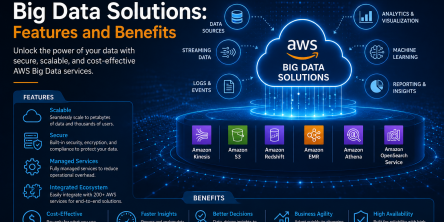
Modern businesses produce large amounts of data daily. Be it from customer transactions, Internet of Things (IoT) sensors, or countless other such sources.

Businesses today need to ship new software faster than ever. That's not news, of course. Anyway, because of the demands on businesses, new solutions are being built on top of micro-services, serverless functions, etc.