

Face, Head, or Body: What an AI Swap Actually Replaces, and Why the Third One Is Hard
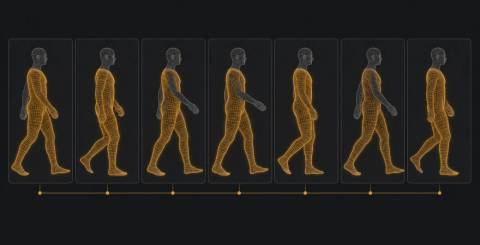
Most people encounter "swap" tools as a single category. A video goes in, a different person comes out, and the marketing rarely bothers to explain what was actually exchanged. That vagueness hides a real technical distinction, and the distinction explains why some results look convincing on the first try while others fall apart the moment somebody turns sideways.
There are three separate jobs hiding under the one word. They are ordered by how much of the frame gets replaced, and the difficulty climbs faster than the size of the region does.
Im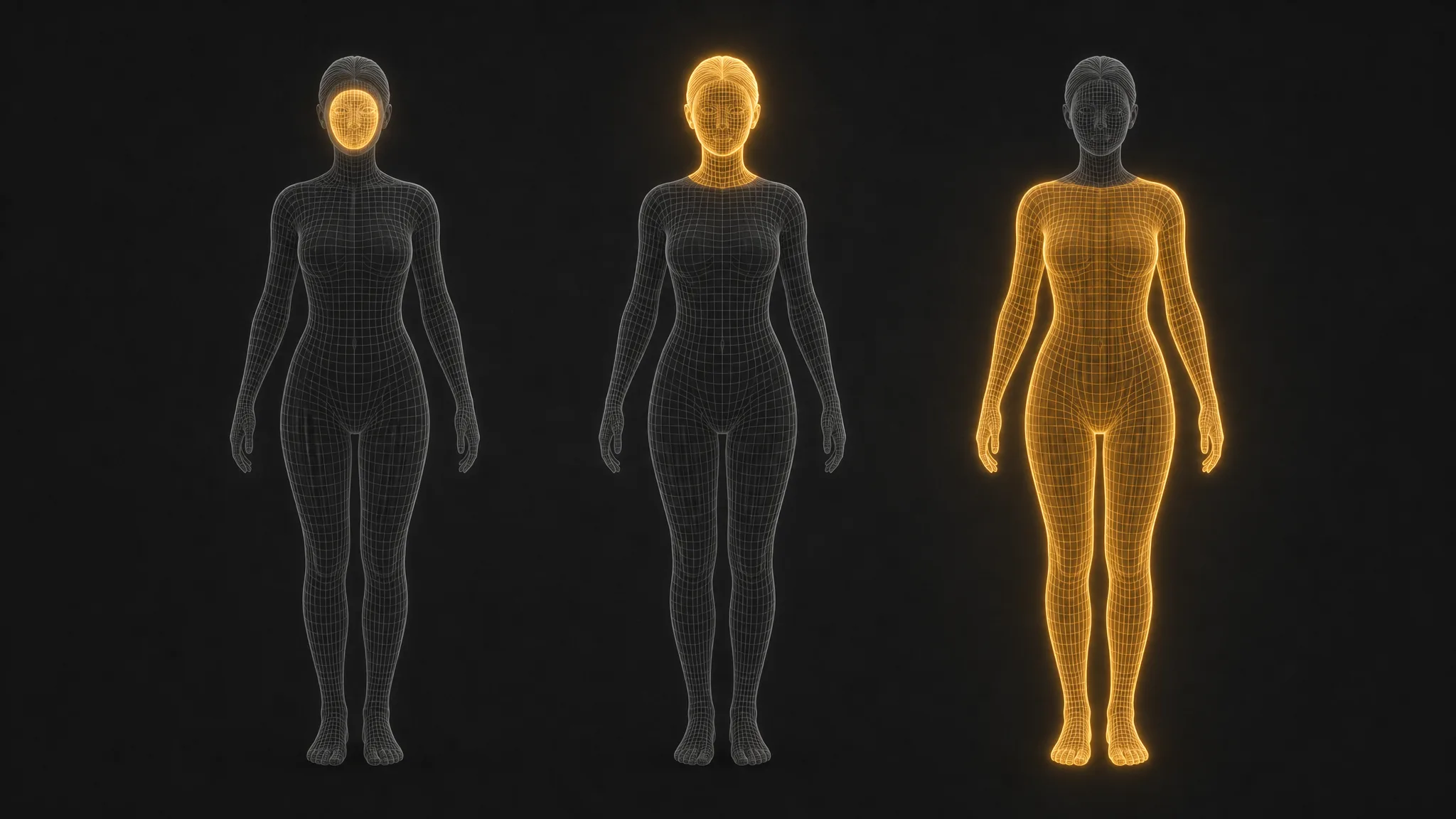
Image source: iMideo
Face Swap Replaces the Smallest Possible Region
A face swap touches only the interior of the face: eyes, nose, mouth, the skin between them. Hairline, ears, jaw outline and neck all stay with the original video. That is why face swaps were the first to look good. The region is small, it is roughly the same shape on everyone, and the model has decades of face-alignment research to lean on.
It is also why they have a characteristic failure. The new face has to fit inside the old head, so a broad face pasted into a narrow skull, or the reverse, produces the slightly compressed look people have learned to spot. The rest of the person is untouched, which is both the strength and the ceiling of the technique.
Head Swap Brings the Hair and the Silhouette With It
A head swap replaces everything above the collar, hair included. This solves the mismatched-skull problem, because the whole head arrives as a unit, but it creates a new one. Hair has no fixed shape. It moves independently of the head, it catches light differently from skin, and where it meets the background it produces thousands of thin, semi-transparent edges that have to be resolved in every frame.
Head swaps therefore live or die at the neck seam and the hair boundary. When they work, the result is far more convincing than a face swap because the silhouette is right. When they fail, the failure is usually a faint halo where the hair meets the background, or a neck that changes tone at the collar.
Body Swap Is a Different Problem Wearing the Same Name
A body swap keeps the original head and replaces everything below it: torso, limbs, clothing, and the way all of it moves. On paper this is just a larger region. In practice it is where the earlier two techniques stop being useful as a foundation.
The face has landmarks that stay put relative to each other. A body does not. Arms cross in front of the torso, legs overlap, a hand disappears behind a hip and reappears a second later. Every one of those moments is an occlusion, and each occlusion forces the model to decide what the hidden region looks like when it has never seen it in this clip. Get one frame wrong and the error propagates, because the next frame is generated with reference to the last.
Clothing makes it worse. Fabric folds, stretches and swings with its own physics, and the replacement body arrives wearing a different outfit whose folds have to be invented from a single reference image rather than observed. A face swap borrows the original video's lighting; a body swap has to synthesise how a jacket that was never in the scene would catch that scene's light while its wearer walks.
Why Temporal Consistency Is the Whole Game
A single swapped frame is easy. Video is hard because the viewer's eye is extraordinarily good at spotting things that flicker. A texture that shifts by a few pixels between frames, a seam that breathes, a shadow that lags the limb casting it: none of these would register in a still image, and all of them register instantly in motion.
This is why the serious implementations track the body across every frame rather than treating the clip as a stack of independent pictures. Tools built for body swap ai work from a reference image plus a source video, and the tracking is what keeps the replacement attached to the person as they move rather than swimming around them. iMideo takes that approach and exposes the resolution choice up front, which is a sensible tradeoff to make visible, because on a body swap the cost of extra pixels is paid in every single frame.
The honest caveat is that no current tool handles every clip. Fast motion, a subject who turns fully away from the camera, or two people overlapping will still defeat most systems. The improvement over the last two years is not that these cases are solved. It is that the ordinary case, one person moving normally in decent light, has gone from unusable to routinely acceptable.
Read more: The Rise of Face Swap Apps: Fun, Trends, and Privacy Concerns
Picking the Right One for the Job
The practical value of knowing the taxonomy is that it tells you which tool to reach for, and which failures to expect.
If the goal is to put a different person's face into a clip and the original hair and build are fine, a face swap is the right call and the cheapest. If the silhouette matters, because the hair or head shape is part of what makes the person recognisable, it needs to be a head swap, and the quality check is the hairline. If the point is to change the outfit, the build, or to drop a person into footage of a different body entirely, only a body swap does it, and the quality check is to watch the arms.
Choosing the wrong one is the commonest cause of bad results, and it is usually not the model's fault. People run a face swap when they wanted a head swap, then blame the output for having the wrong hair.
The Region Is the Difficulty
Every step up this ladder trades a known, well-behaved region for a larger one that moves in ways the model has to infer. Face swaps are mature because faces are cooperative. Body swaps are still improving because bodies are not, and because every frame in a video is a fresh chance to get the inference wrong.
That is worth keeping in mind the next time a tool promises to swap "anything." It probably can. The question is which of the three things it is actually doing, and whether the clip you are handing it has the arms out of the way.
Similar Articles

ChatGPT can turn a rough idea into a first draft, explain an unfamiliar concept, or help organize a project plan in minutes. That speed makes it tempting to treat the tool like an all-purpose expert.

Why AI answer engines overlook manufacturer catalogs: PDFs, bare part numbers, and thin pages hide expertise. Learn how to make products citable.

Anthropic, the American company behind Claude, is among the most closely watched companies by investors in artificial intelligence. But how can an individual invest in Anthropic when the company is not yet publicly traded?

Discover three key factors for optimizing your AI model, including performance, accuracy, and efficiency, to achieve better results and reduce costs.

Building an AI model is only one part of creating a system that works in practice. Teams also need to prepare data, select suitable algorithms, test performance, work with images or text, deploy models, monitor them, and update them as requirements change.

Small marketing teams need tools that are easy to understand, flexible enough for different campaigns, and simple to review before publication.

Short-form storytelling requires more than attractive visuals. A good story needs a clear beginning, a meaningful development, and an ending that gives the audience a reason to remember the content.

Discover how AI is transforming customer service by handling routine enquiries, improving routing, assisting employees and helping businesses spot patterns.

AI visual tools help solo creators generate thumbnails, images, and video fast—cutting design time without sacrificing quality or workflow.