

Avoid These AI Avatar Generator Mistakes in Talking Videos
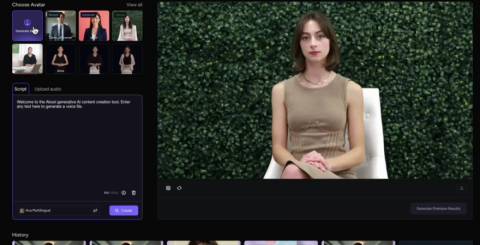
A talking avatar can save days of filming, yet plenty of finished videos still leave viewers uneasy, and they cannot always explain why. The presenter looks fine in a thumbnail, but the voice feels flat, the timing feels odd, or the background fights for attention. In most cases the tool is not the main problem. Small decisions made before and after generation add up to a result that feels artificial.
This article covers five habits that quietly hurt talking videos and shows how to fix each one with changes you can make today. It is written for course creators, support teams that record help videos, and small business owners who publish short announcements. None of the fixes require design skills or technical knowledge. They only ask you to treat the avatar as a real speaker whose delivery, setting, and script deserve the same care you would give a person standing in front of a camera.
Writing for the Eye Instead of the Ear
Most weak avatar videos start with a script that was written as a document. Long sentences, stacked clauses, and abbreviations read well on a page but sound stiff when spoken. When you feed that text into an AI avatar generator, the voice delivers every word faithfully, which exposes how unnatural the writing was.
Fix this by reading each line aloud before generating. If you run out of breath, split the sentence. If a phrase sounds like a brochure, rewrite it the way you would say it to a colleague. Spell out numbers and acronyms the way they should be pronounced, and put the key point at the start of each sentence so the viewer never waits for the verb.
Length is part of the same mistake. A script that tries to cover an entire product in one take tires the audience. Break it into short scenes with a single idea each, and let on-screen text or images carry the details that are hard to say aloud.

Read more: The Almost-Right Image Problem: Getting Better Results from an AI Picture Editor
Starting With a Weak Source Image
If you build a custom presenter from a photo or clip, the source decides the ceiling for quality. Photos with harsh shadows, tilted heads, or partly hidden faces produce uneven motion around the mouth and eyes. Low resolution images blur teeth and lips, which are the details viewers watch most closely.
Choose a front-facing photo taken in soft, even light with the whole face visible and no glare on glasses. A plain background helps the tool separate the person from the scene. When working with AKOOL or any similar service, upload the best frame you have rather than the most recent one.
Before producing a full video, generate a ten-second test. Watch the teeth, the edges of the hair, and the area around the jaw. These spots reveal problems early, when changing the photo costs a minute instead of an hour. If you plan a series, reuse the same approved source so the presenter looks identical in every episode.
Ignoring Pace, Pauses, and Emphasis
A voice that never changes speed or stress sounds robotic even when the pronunciation is perfect. People pause before important points, slow down for complex ideas, and lift their tone at the end of a question. Without these cues the video feels like a recording of someone reading a manual.
You can shape delivery through punctuation and sentence structure. Commas create short pauses, full stops create longer ones, and short sentences inside a long paragraph produce a natural change of rhythm. Many tools also let you adjust speaking speed or choose a tone of voice, so test two or three settings on the same paragraph and pick the one that sounds like a person you would listen to for several minutes.
Listen with your eyes closed once. If you want to speed it up or skip ahead, so will your viewers. That reaction is a signal to trim words or add a pause where the idea needs space.
Forgetting the Space Around the Avatar
A presenter does not exist alone on screen. The background, captions, and supporting visuals shape how real the whole video feels. A plain, centered avatar against a flat color can look unfinished, while a cluttered scene pulls attention away from the speaker.
Consider these simple additions:
- A background that fits the topic, such as an office, a classroom, or a branded color field
- Captions in a readable font, placed clear of the face
- Short cutaways to screenshots, product images, or diagrams when the script mentions them
Cutaways are especially useful because they break up long stretches of a single face. Switch between the presenter and supporting visuals every few sentences, and the video gains energy without extra effort. Keep fonts, colors, and logo placement consistent across every video, so viewers recognize your content quickly.

Skipping the Final Human Review
The last mistake is trusting the first export. Even strong tools make small errors with names, product terms, and unusual words. A mispronounced company name or a wrongly stressed technical term can undermine an otherwise polished video.
Build a short review routine. Watch the video once at normal speed with the sound on, once with the sound off to check captions and visuals, and once more only on the sections that contain names or numbers. If the video is in a second language, ask a native speaker to listen as well. Many tools let you add a phonetic spelling for hard words, which fixes pronunciation without rewriting the sentence.
Save an approved version of each script and settings file. When you later update the video, you can change only the lines that need it, and the new version will still match the earlier ones in tone and look.
Small Fixes That Make Avatars Feel Human
Viewers rarely reject avatar videos because the technology exists. They reject them because the delivery feels careless. Write scripts for speaking, start from a sharp source image, shape pace with punctuation, design the space around the presenter, and review every export before it goes live. Each fix takes only minutes, yet together they change how professional a video feels.
Pick one habit to improve in your next project, then add another with each new video. Keep notes on what worked so your team builds a shared standard instead of repeating the same errors. Over time the avatar stops being the first thing viewers notice, and the message you wanted to share takes its rightful place at the center.
Similar Articles

The best free CGPA calculator depends on your university and what you need besides a number.

A product photograph can already contain almost everything a campaign needs: the right lighting, a carefully chosen background, and a recognizable subject. Turning it into video introduces a different question. What should actually move?
Animate any photo with Kling, Seedance, Veo, MiniMax and Grok Imagine in one browser workspace. Compare results side by side with one credit balance.

A product photograph can be sharp, well lit, and still be difficult to use. The background competes with the item. A reflection hides part of the label.

ChatGPT can turn a rough idea into a first draft, explain an unfamiliar concept, or help organize a project plan in minutes. That speed makes it tempting to treat the tool like an all-purpose expert.

Why AI answer engines overlook manufacturer catalogs: PDFs, bare part numbers, and thin pages hide expertise. Learn how to make products citable.
Anthropic, the American company behind Claude, is among the most closely watched companies by investors in artificial intelligence. But how can an individual invest in Anthropic when the company is not yet publicly traded?

Discover three key factors for optimizing your AI model, including performance, accuracy, and efficiency, to achieve better results and reduce costs.

Building an AI model is only one part of creating a system that works in practice. Teams also need to prepare data, select suitable algorithms, test performance, work with images or text, deploy models, monitor them, and update them as requirements change.