

Integrating Home Health Software: Steps to a Smooth Transition

Implementing home health systems is a complex process that requires skillful planning and preparation. You’ll want to identify the areas for improvement as well as the features that impact your agency. By outlining what you’re looking for in software, you can narrow down your options and determine which software solution is right for you.
Consider the current pace of your agency and what is needed to support your workflows. Every organization operates uniquely. Finding a system that you can tailor to your agency will allow you to align with your agency’s specific style.
Moreover, you’ll want to try out demos before deciding on the best options. Defining how well a system focuses on data management, team collaboration, and interoperability will give you a greater idea of what you're working with and how to go about transitioning to this new home health software system. For more information on integrating a home health solution at your agency, continue reading below.
Home Health Software Prioritizes Data And Communication.
Transitioning to a new home health software will take some time. Set your agency up for success by prioritizing the essentials that make the biggest impact on your organization. Focusing on data management and interoperability may allow your team to begin exchanging data across other software solutions and give you an instant advantage in your progress.
Likewise, checking that this software is communicating with the other applications your team is consistent with is essential. Systems like home care management software should be reviewed for this connectivity to ensure that your new system is integrating seamlessly with the others your team frequently uses. By enabling system integrations, your agency can start using all relevant systems to prioritize data management and connectivity right away.
Data migration is another key component to consider as you integrate a new system. You want to ensure that your old data will transfer over to your new system without issues. Creating a strategy for your data migration can potentially prevent any hurdles that come into play when training with new home health software.
Keep Your Team Engaged On System Changes.
Encourage Your Team To Ask Questions.
Inform your team about the changes being made to the software you’re adding to your operational lineup. Give opportunities to help staff receive the support and training they may need to utilize the home health software. By encouraging your team to ask questions and learn, you can help them become familiar with the software faster, allowing for a seamless transition over time.
Ask For Feedback And Make Changes.
Be sure to inquire about team feedback and review the software so you can make changes to improve the software, daily workflows, and overall operational flow. With these changes, you can increase the efficiency and engagement of your agency and achieve better patient care outcomes as a result.
Create Adaptive Training Programs For Users.
Establish a staff training program that gives users the skills and information they need to effectively use the new home health software. Use different styles of training to encourage team engagement and support different styles of learning. You might consider classroom training, online, and interactive training sessions with secondary resources for additional teaching.
Monitor Performance And Track Critical Metrics.
Be sure to optimize your home health software by monitoring performance and tracking essential metrics for problem areas. Noting areas for improvement and making changes as feedback is given can give you time to make changes so your team can adjust. Minimize interference by testing the software for data accuracy. You can test how well your new home health software responds to likely tasks and situations that can occur within the work environment. Getting an idea of how well it responds in your specific environment may give you insights into how to optimize your system.
Transition To Your New System Smoothly.
For a smooth transition, integrate your home health software strategically. Utilize the above suggestions to map out the order of operations that make the most sense for your agency and its needs while transitioning to a new system. By looking out for ways to sync up your data and train your team effectively, you can integrate your software and transition to your new system smoothly.
Similar Articles

Field sales teams handle numerous responsibilities every day. Sales representatives travel between customer locations, conduct meetings, collect orders, record information, and report their activities to managers.

The app development market has evolved significantly over the past decade or so. Its impact on business has been equally consequential.

Offshore IT hiring means recruiting IT professionals who work from another country or region. Companies commonly use this approach for software development, QA, IT support, DevOps, cybersecurity, data, and project management.

By 2026, moving to the cloud is no longer merely a competitive advantage. It is a business necessity. Every organization across the broad spectrum of industries will be challenged to become more agile.

Real-time dashboard showing multi-level commission tracking and distributor performance metrics

Digital transformation initiatives are no longer unheard of in the corporate world. As a matter of fact, it is also well known that companies expanding their digital footprint tend to run into crippling legacy apps.

The financial aid office has become one of the most operationally strained departments on the modern U.S. campus. FAFSA complexity, chronic staff turnover, tightening Title IV compliance obligations, and the persistent problem of unspent scholarship dollars have pushed administrators toward purpose-built financial aid management software
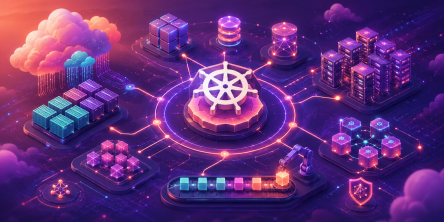
The demand for software delivery has never been higher. Applications must be delivered faster and on a scale like never before.
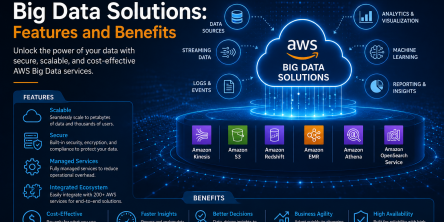
Modern businesses produce large amounts of data daily. Be it from customer transactions, Internet of Things (IoT) sensors, or countless other such sources.