

Designing a Reusable Content Pipeline for Complex Product Documentation
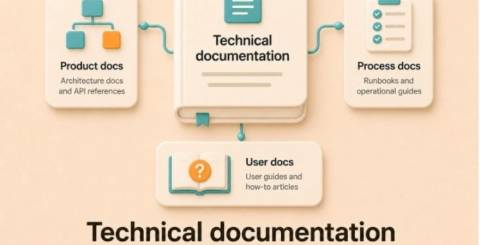
Documentation for complex products touches every function in a company. Engineering defines torque values and part numbers, product management names features, quality teams track changes, and service leaders need clear field instructions. If these inputs do not flow through a consistent pipeline, manuals drift from the product, safety language becomes inconsistent, and updates take too long. A reusable content pipeline connects sources like CAD, PLM, and firmware repositories to publishable outputs such as service manuals, parts catalogs, in-app help, and API references. The goal is simple: author once, reuse across variants and channels, and prove traceability when something changes.
1. Mapping Engineering Sources to Publishable Content
Start by drawing a line from each source system to the document types it influences. CAD and the bill of materials shape exploded views and parts lists. PLM fields feed effectivity, change notices, and component supersessions. ERP supports spare parts pricing and availability codes. Firmware repositories and issue trackers drive release notes and troubleshooting trees. This map exposes where values originate, how they should be transformed, and which approvals are required before the information becomes public.
As teams evaluate technical documentation solutions, look for connectors to core systems and a clear plan for keeping data synchronized. If a torque value changes in CAD metadata, the update should cascade to the assembly procedure, inspection checklist, and service bulletin without manual retyping. When that flow is not defined, authors create local copies, which quickly drift. A simple pilot helps prove the path: change a fastener spec in PLM, watch it update the parts catalog table, republish the procedure, and confirm the revision history captures who approved the change.
2. Modular Authoring and Variant Management
Reusable content depends on structured authoring. Models based on topics like DITA and S1000D, or clearly defined XML schemas, let authors break procedures, safety statements, and reference values into components. Common steps become snippets, variables store product names and ratings, and conditional processing handles options. Metadata such as serial effectivity, region, and configuration tells the system which pieces assemble for a given output. The result is a set of building blocks rather than a brittle, monolithic manual.
Variant management is a balancing act. Lean too hard on conditional text, and you create pages dense with conditional markers that are tough to review. Split too aggressively into tiny snippets,s and you drown in assembly rules. A practical pattern is to keep one complete topic per task, reuse smaller steps that are truly common, and drive variants with a small set of clear attributes. For example, a pump line with three motor options and two regional safety regimes can combine one base installation topic, torque tables for specific options, and regional hazard statements selected by metadata instead of duplicating entire chapters.
3. Governance: Reviews, Traceability, and Safety Language
Governance turns a content model into an auditable process. A component content management system (CCMS) can assign reviewers, lock versions, and record approvals at the topic level. Tie those reviews to engineering change orders so every document change cites the underlying reason, such as a material switch or a firmware update. Redline views help subject matter experts compare before and after, while required fields force authors to capture revision notes, effectivity dates, and impacted models.
A common failure point is treating a change as a layout problem. Swapping a diagram or nudging a paragraph without linking it to a requirement or ECO breaks traceability and makes audits painful. Safety language needs particular care. Hazard statements should use controlled terminology, standards-approved icon sets, and rules for signal words and consequences. Create a single library of approved hazards and callouts. When a product adds a pinch risk, authors add an entry to that library and reference it in tasks rather than inventing warnings without a consistent standard that drifts across translations and channels.
4. Multichannel Delivery and Asset Choices
Final outputs vary by audience and context. Field technicians often need offline PDFs with bookmarks and strong page references. Operators may prefer HTML5 help with search and video clips. Product teams might embed context-relevant help in the UI, while service portals present parts catalogs organized by serial number. The same source topics can publish to all of these if assets and templates are chosen with reuse in mind. For illustrations, vector art such as SVG scales cleanly on high-resolution screens and can be recolored by themes, but large assembly views with gradients might render better as optimized PNGs. That tradeoff is worth testing on target devices.
3D models add another decision point. Converting CAD to lightweight formats like glTF enables interactive browser views and AR overlays, but preparing those assets requires decimation, material simplification, and careful labeling. If your field environment is dusty or bright, an interactive 3D model may be less usable than a crisp, numbered line drawing. QR codes on the product can route to content specific to each serial number, but plan for dead zones by ensuring a printable alternative exists. A practical example: a technician scans a code to view a short video for a harness routing step, but the manual still includes a drawing with two panels and callouts for when a signal is weak.
Translation, Metrics, and Long-Term Maintenance
Translation speed and cost improve dramatically when content is structured. Translation memory works best with consistent sentence boundaries and controlled terminology. Lock approved product names, torque values, and hazard phrases as protected terms. Build style rules that avoid phrasings known to expand excessively in certain languages, which helps keep UI overlays and portable formats within their layout constraints. Push only final, approved topics to localization to avoid repeated work, and use translation in advance for reused snippets so publications with many variants do not multiply word counts unnecessarily.
Measure how content performs after release. Search logs reveal missing synonyms and mislabeled parts. Service tickets show which procedures cause callbacks. Time required to publish after an ECO highlights bottlenecks in reviews or data import. Set a maintenance rhythm that matches product release trains. Quarterly firmware releases, for instance, may justify a standing short review cycle that bundles release notes, updated screenshots, and any affected troubleshooting trees. Guard against content debt by scheduling audits of top tasks, checking that links resolve, QR codes stay valid, and references between sections still point to the right steps. Renumbering without stable IDs is a classic way to break deep links, so assign persistent identifiers at the topic and step level from the start.
Building a reusable content pipeline is a practical engineering project in its own right. Map sources to outputs, author in modular topics, govern changes with traceability, choose assets that survive channel shifts, and watch translation and maintenance. The payoff is not just cleaner manuals. It is a system where a single update to a specification can reliably reach the field, where regional rules are applied consistently, and where teams can prove what changed, when it changed, and why. That confidence saves time, reduces errors, and supports safer products that are easier to service.
Similar Articles
Learn how to crop a PDF online using an official tool. Remove unwanted margins, adjust page layouts, and create clean, professional PDF documents easily.

For many SaaS teams, the decision to adopt Auth0 early on makes perfect sense.

Explore supported file formats for online learning aid platforms and learn how to import content for creating flashcards, mind maps, and quizzes.

Learn how to compare cordless yard tools by battery runtime, cutting performance, power, and efficiency to choose the right equipment for your lawn.

In today's highly competitive corporate environment, clinging to outdated technology is a costly mistake. Enterprises globally are realising that their legacy systems, once the backbone of their operations, are now creating severe bottlenecks.

Learn how knowledge management clears duplicate files and conflicting policies, creates one source of truth and keeps your AI and teams accurate.

Giga vs eight for calls: compare talktime, SMS, and IDD allowances, plus what happens when minutes run out, so you pick the right SIM-only plan.

Stay powered and connected with Belkin's portable power banks, chargers, durable cables and routers built for modern devices and everyday reliability.

Learn how Belkin's innovative connectivity solutions, from durable USB-C cables to fast charging, are reshaping everyday tech accessories.