

Cloud Disaster Recovery Solution for IT Downtime Concerns
IT industry is running at a pace that demands business continuity as a key to success.
So, to catch up to the fast-growing business demands, run for continuous execution is the need of the hour. At this juncture, IT downtime either as a result of internal failure or as a consequence of unexpected natural incident remains to be a key concern for many firms.
What does an IT Downtime mean To an Organization?
According to Gartner, IT downtime costs firms a whopping USD 5600 per minute, equaling to around USD 300K per hour. Gartner says that this is an average, and figures vary based on the characteristics of the business and environment. The study indicates losses to the extent of USD 140K-540K per hour on an average.
Looking at these figures, one can gauge the extent of loss that an unexpected incident can cause to an organization on multiple fronts.
An IT downtime halts:
- Company’s services to customers, hurting customer satisfaction factor for the company
- Internal functioning as related applications, databases, and infrastructure move out of service
- Business continuity hits a company’s reputation in terms of reliability and technical competence
These challenges could be the result of:
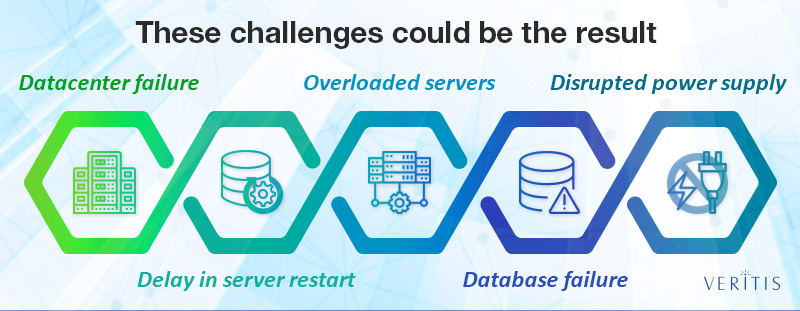
- Datacenter failure
- Delay in server restart
- Overloaded servers
- Database failure as a result of an improper network partition
- Disrupted power supply
Real-time scenarios show:
- A fir broke-out at server location caused Delta Airlines a USD 100 million revenue loss
- GitHub had to suffer lengthy downtime due to database failures
- The disruption caused by manual error had hit British Airways IT systems, causing the company a huge loss, halting around 750,000 passengers, 400 flights and USD 100 million revenue loss
List not exhaustive! There are many such both reported and unreported.
The industry presents a single solution for all such challenges, i.e. Disaster Recovery.
Disaster Recovery As a Solution
While there is a ‘Backup’ option to avoid data loss, it has some limitations compared to Disaster Recovery (DR). Backups reduce the risk of data loss. Whereas, a DR infrastructure avoids downtime altogether.
Many CIOs wish to have Disaster Recovery (DR) systems running in their operating environment and the key aspect they consider in DR strategy is the difference in ‘ability to recovery’ on-premise and an outsourced hosting environment.
Lack of inabilities to provide required remote data centers, related expertise, and recovery software/hardware systems is pushing majority companies to look for Managed Services or Cloud Infrastructure as reliable and cost-effective options for DR Strategy.
Cloud-based DR for IT Downtime Challenges
A Forrester report has shown 66 percent of its survey respondents reporting DR as their high business priority. While some opted for on-site or traditional DR service, the remaining decided to go with cloud-based Disaster Recovery-as-a-Service (DRaaS).
The report noted a substantial rise in demand for cloud-based DRaaS services (23 percent increase as of 2016), and the projections went on to become real showing positive trend further.
New cloud advancements began offering cost-efficient solutions to business!
Replacing the need for the remote site, cloud-based DRaaS promoted the use of physical and virtual infrastructure and brought dedicated high-speed data links in place, along with redundant operating system and application licenses.
Reports have proven that the combination of cloud methodology and a DR Management software worked effectively in achieving business continuity and high value at low investment.
Further advancements in DRaaS have added to the power of cloud, allowing businesses to even run hybrid IT production systems across their data centers for normal operations and also create replicas of the same as and when needed. The hybrid cloud DR model has eliminated the need for secondary DR sites, alongside delivering traditional value-offerings and extending solutions even to remote locations.
Cloud DR made a major difference by minimizing the costs incurred on key DR objectives: Recovery Point Objective (RPO) and Recovery Time Objective (RTO), which were once associated with huge investments in network and server infrastructure.
How Different is Cloud Disaster Recovery?
Flexibility, cost-effectiveness and high reliability of cloud servers over physical servers makes the cloud-based Disaster Recovery a viable solution for any firm. Disaster Recovery using physical servers might lead to redundancy creating the need for multiple compatible servers that also demand additional maintenance costs.
Whereas, cloud platform works otherwise with the help of virtual machines and syncs data in a faster way. With all the prerequisite software and data installed, a cloud server takes hardly any spin-up time, thus avoiding emergency for DR until required.
Cloud DR solution offers a very quick response time to unexpected incidents. Thanks to the choice of automating DR that cuts down failover and infrastructure deployment time!
An automated cloud DR performs recovery at a very faster rate, even much before the outage reaches the end-user.
However, it is important to keep DR infrastructure under regular testing to ensure it won’t compromise during unexpected incidents. And, here is where automation plays vital in making it easier to run tests at regular intervals.
Moreover, a managed cloud DR platform overrides the need for building, configuring and testing physical and virtual infrastructure layers, as you have vendors out there to do so!
What more? Get a Cloud-based Disaster Recovery solution to deal with unexpected IT downtimes in a hassle-free manner!
Similar Articles

Selecting the correct pipe type for a high-pressure system is one of the most consequential decisions an engineer or procurement manager will make on any industrial project.
Managing multiple documents can quickly become frustrating. Imagine sending several files in an email, uploading different attachments to a submission portal, or sharing a business report with clients across multiple documents.

Energy efficiency is revolutionizing power distribution, leading to more sustainable and cost-effective energy systems.

Moving has a way of making even organized people feel scattered. One minute you’re labeling boxes. The next, you’re hunting for a receipt, calling the utility company, and wondering where the tape disappeared to.

Apple devices break more than owners expect. This guide shows the cases, screen protectors, and Apple Watch bands that stop cracks, scratches, and costly repairs, plus how to change apple watch band in under a minute.

The aviation industry is rapidly modernizing, shifting from reactive, paper-heavy maintenance to highly automated, predictive ecosystems.

Learn what makes users trust a health app instantly and discover the design, security, and user experience factors that drive long term engagement.
Learn how Thunderbolt 4 docking stations support multiple displays, deliver fast data transfer, and create a streamlined, productive workspace.
Learn how ML development teams measure ROI from machine learning investments by tracking revenue growth, cost savings, productivity gains, risk reduction, and long-term business outcomes.